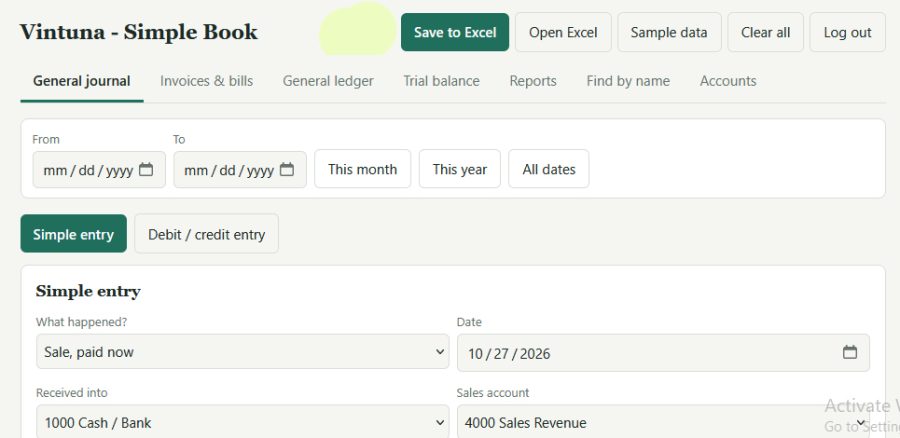

Running a website business is hard enough without worrying about complicated accounting software. That is why we made Simple Books, a free, easy accounting page that runs in your web browser. There is nothing to install and no monthly fee.
What it does
You record your sales and expenses. Simple Books does the rest. Every entry goes automatically from the journal to the ledger and then to the trial balance, so you can always see if your books balance.
Easy to start
Don’t know debit and credit? No problem. Use Simple entry and choose what happened: a sale, an expense, a customer payment, or money you put into the business. The page makes the accounting entry for you.
If you know accounting, the full debit and credit form is there too.
What you get
- Journal, ledger and trial balance that update by themselves
- Income statement and balance sheet to see your profit and what you own
- Invoices and bills to track who owes you and whom you owe
- Find by name to see everything for one person or company
- Sales tax or VAT tracking
- Date filter to look at any month or year
- Login so each user keeps separate books
- Your own business name and logo
- Save to Excel to back up your books or share them with your accountant
Works anywhere
Simple Books works on your phone and your computer, in light or dark mode. Your books are saved in your own browser, so your data stays with you.
Good to know
Because your data lives in your browser, save to Excel now and then as a backup. Simple Books is built for small businesses with simple needs. It is not meant for large companies with many staff.
Try it today
Create an account, add your first sale, and watch your books fill in by themselves and this contain ads, you can remove by your self.
Features
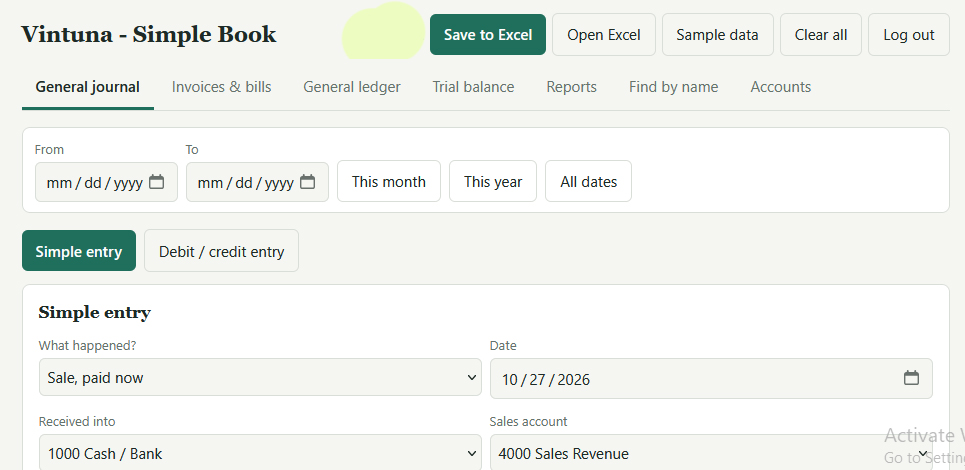
Login and users
- Create an account and log in with a username and password.
- Each user has separate books. Log out from the top bar.
- Data is saved in your browser only.
Entering transactions
- Simple entry: pick what happened (sale paid or on credit, customer pays us, expense paid or on credit, we pay a bill, owner puts in or takes money). The page makes the debit and credit lines for you.
- Debit / credit entry: the full journal form with as many lines as you need. Save only works when debits equal credits.
- Optional fields on every entry: person name, company, and a reference such as an invoice or order number.
- Edit or delete any entry from the journal list.
- Sample data button and Clear all button.
Books and reports
- General journal: all entries, newest first.
- General ledger: entries posted to each account automatically, with running balances and a “Balance brought forward” line when you filter by date.
- Trial balance: totals for each account, a check that debits equal credits, a profit or loss line, and a Print button.
- Income statement and balance sheet on the Reports tab.
- Date filter: From and To dates with quick buttons for this month, this year and all dates.
Invoices and bills
- Create an invoice (a customer owes you) or a bill (you owe a supplier), with a due date.
- The page makes the journal entry and numbers it, for example INV-001 or BILL-001.
- Record full or part payments. Status shows Unpaid, Part paid, Paid or Overdue.
- Overview of money owed to you and by you, plus lists of customers who owe you and suppliers you owe.
Find by name
- Search by person or company to see every entry and totals by account.
Tax
- Optional tax rate % on sales, expenses, invoices and bills.
- A sales tax / VAT summary showing tax collected, tax paid, and what you owe or are due back.
Setup and control
- Accounts tab: a ready chart of accounts for a website business. You can add or delete accounts.
- Opening balances for starting in the middle of a year.
- Settings: book or business name, logo image, currency label, and a year lock that stops changes on or before a date.
Excel and backup
- Save to Excel: a file with sheets for Journal, Ledger, Trial Balance, Income Statement, Balance Sheet, Invoices and Accounts.
- Open Excel: restores your books from a file saved by this program.
- A backup reminder appears if you have not saved to Excel for 7 days.
Page
- Works on phones and computers, with light and dark mode.
- Footer: “© 2026 Vintuna Web Solution”.
- An ad space under the title, set up by editing the file.
Not included: real multi-currency conversion, sign-in from different computers, and online storage. Those would need a server and database.
Download Now
Your link will be available in:
Please wait 20 seconds…